An OrbaOS product · Rondanini Publishing Ltd · v2026.05
v2026.05 For Heads of QA who can't send tickets to a SaaS LLM.

Test design at the speed
of the LLM you already pay for.

ScenarioForge ingests your Jira, Linear, Azure DevOps, GitHub, GitLab or YouTrack tickets and produces reviewable scenarios, executable test cases, and Confluence docs — natively self-hosted on your own infra, with your LLM credential. No SaaS, no middleman.

Natively self-hosted (Docker / Helm) Bring your own LLM key No telemetry No token margin
PlatformNot just scenario generation

Project Cockpit + ScenarioForge — one end-to-end path

Programme governance on Jira (dashboards, G0–G6 gates, RAID, SteerCo exports) wired to AI test design. Setup the cockpit, run pre-flight traceability, generate scenarios, human review, publish back to Jira — with webhooks and schedules closing the loop.

See the full platform tour →
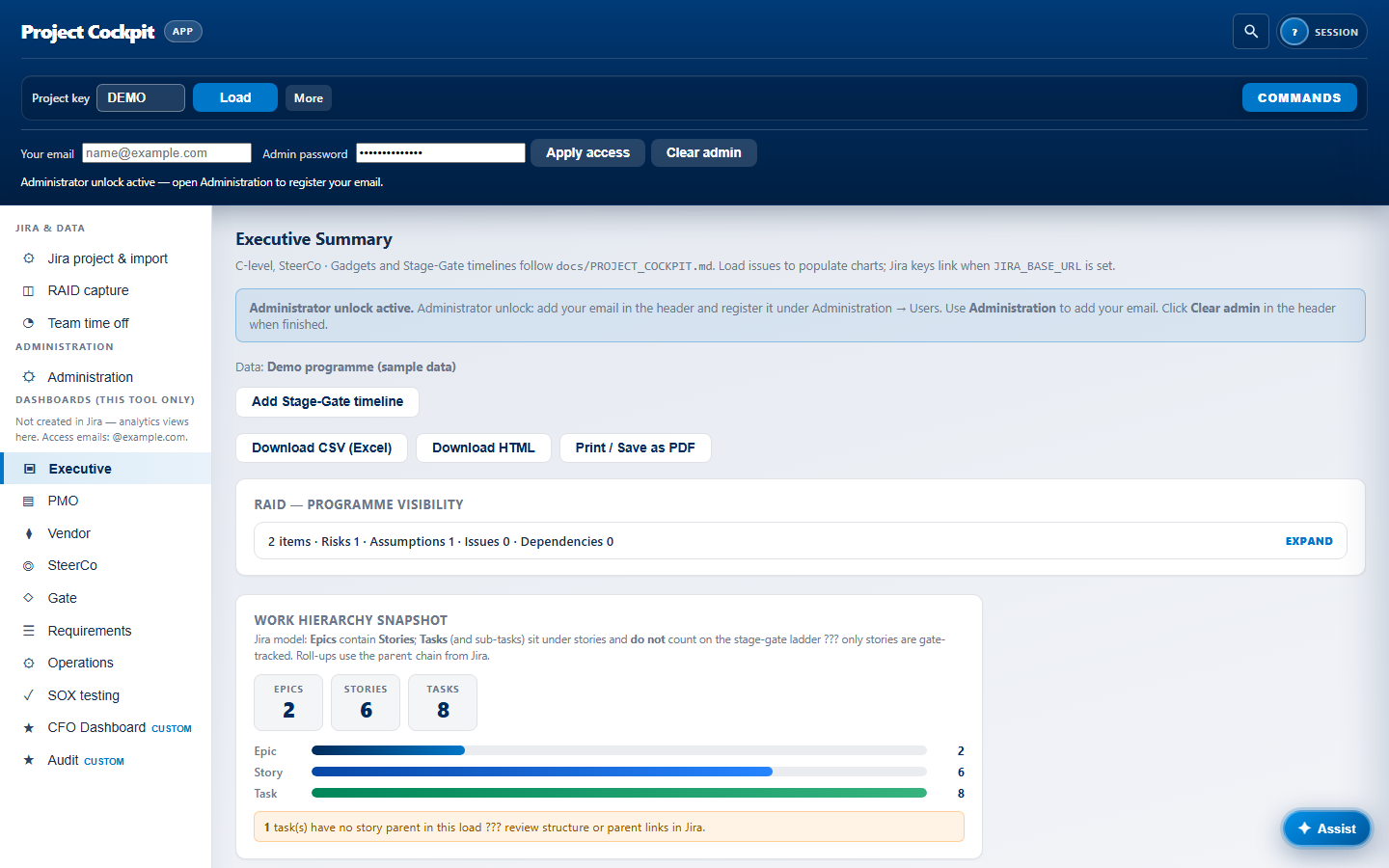
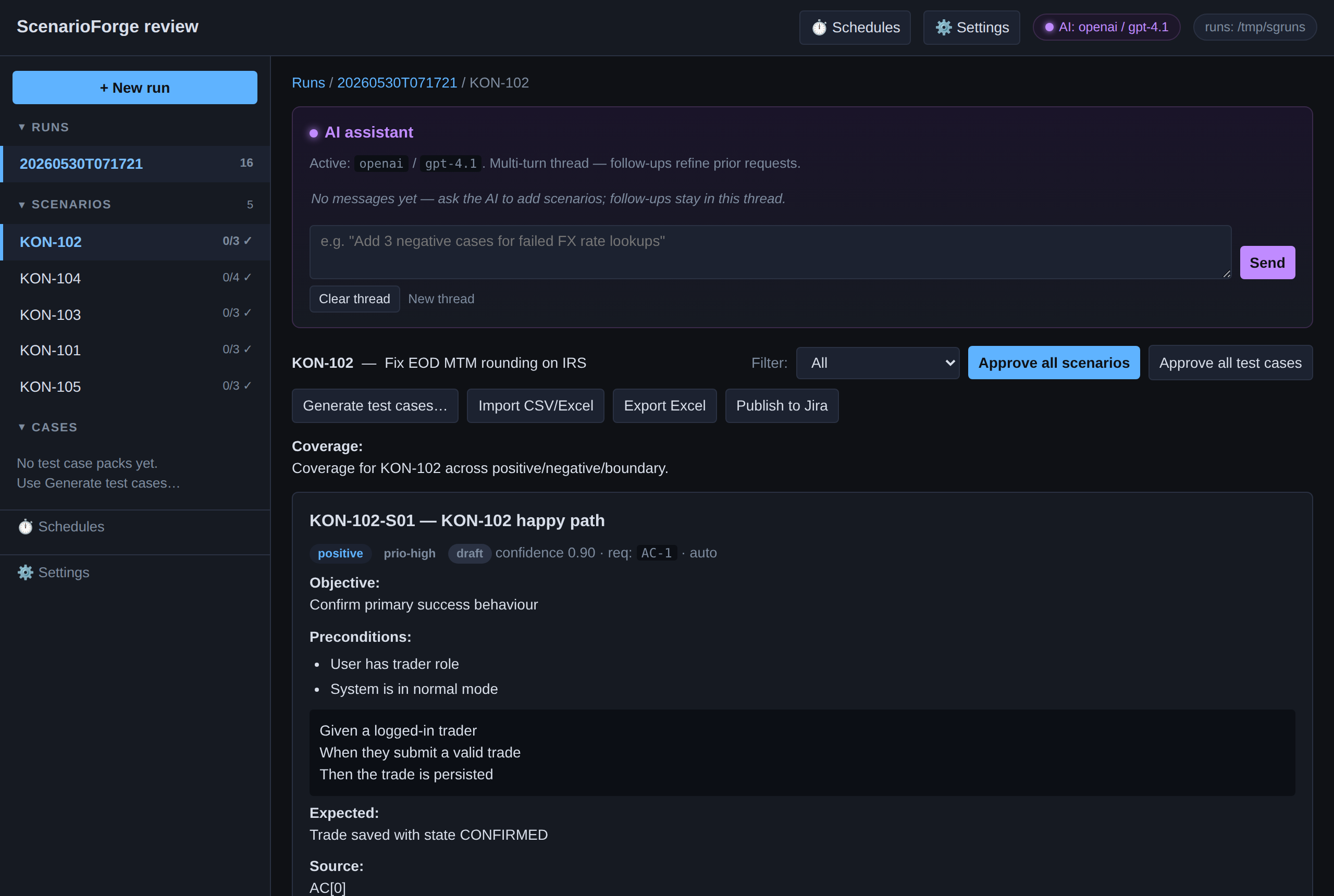
Project Cockpit executive dashboard alongside ScenarioForge integration
01 The bottleneck

QA test design is the slow lane — not test execution.

By the time a ticket is groomed, the engineer is already typing. The QA lead, meanwhile, is still translating "the overdraft logic changed" into 80 scenarios, 30 edge cases, and a Confluence page no one will read.

ScenarioForge runs that translation in your VPC, against the LLM your security team already cleared, and hands you a reviewable artifact — not a black box. Reviewers stay in the loop; the writer pushes only what's been approved.

Median time to first reviewable bundle cards-eng-iss-887, 24 tickets 4:18min, wall clock
Days saved per sprint internal pilot, 8 squads 3.2vs. manual test design
Tokens proxied through us since v2026.01 0that's the point
Customer LLM keys ever stored your container, your secret 0also the point
02 How it works

Four steps, every one reversible.

You can stop after step 2 and review forever. You can re-run step 3 with a different writer. You can re-publish step 4 without duplicating Confluence pages. ScenarioForge is idempotent end-to-end.

01 · INGEST

Pull tickets in.

Connect Jira, Linear, Azure DevOps, GitHub Issues, GitLab Issues, or YouTrack. ScenarioForge reads the requirement and any linked context (acceptance criteria, attached specs, parent epics).

supports: JQL · Linear views · ADO queries · GH labels
02 · GENERATE

Produce a bundle.

Your LLM credential generates a reviewable bundle: scenarios, executable test cases, coverage map, and an RTM stub. Streamed in chunks; cancellable mid-run.

byok: openai · azure · bedrock · anthropic · gemini · vllm
03 · REVIEW

Approve in the dashboard.

Reviewers triage, edit, or reject tests. Diff against the source ticket lives in the same view. Nothing leaves the reviewer's hands until they approve it.

audit: every action under <state>/auth/
04 · PUBLISH

Push everywhere.

Back to your tracker (four writer modes, including Xray and Epic → Story → Sub-task hierarchy). Forward to Confluence as per-bundle pages plus an RTM page. Re-publishes are idempotent.

modes: comment · native Test · Xray · hierarchy
03 Trackers & targets

Six ingest sources. Four writer modes. One Confluence publisher.

Same ingest → review → push flow regardless of which tracker your customer happens to be on. If you sell consulting, this is what lets you say "yes" to whatever they use.

Jirastable

Cloud + Server + Data Center. Ingest by JQL.

writer modes: comment · native Test · Xray · epic → story → sub-task
Linearstable

Ingest by team, view, or label. OAuth or PAT.

writer modes: comment · sub-issue
Azure DevOpsstable

Ingest by query, area path, or iteration.

writer modes: Test Case work item · linked Task
GitHub Issuesstable

Ingest by repo + label. Projects v2 supported.

writer modes: comment · issue · checklist
GitLab Issuesstable

Ingest by group, milestone, or label.

writer modes: comment · issue · linked merge request
YouTrackstable

Ingest by saved search. JetBrains-shop friendly.

writer modes: comment · linked test issue
+ Publish
Confluence — one-click publish, per-bundle pages plus a Requirement Traceability Matrix. Idempotent: re-publishing doesn't duplicate.
Notion / SharePoint — not yet
04 BYOK & privacy

What "self-host" actually means.

Three promises. No icons, no infographics — just the contract.

01 · Keys

Your LLM keys, your bill.

We don't proxy your prompts. The OpenAI / Azure / Bedrock / Anthropic / Gemini / vLLM credential lives in your container's secret store and goes straight from your VPC to the provider you chose. Token spend hits your provider account, not ours. There is no token margin to extract.

OpenAIAzure OpenAIBedrockAnthropicGeminivLLMLM Studio
02 · Infra

Your infra, your data.

Self-host via Docker or Helm. Run in your VPC. Pair with a self-hosted OpenAI-compatible LLM and the system is air-gap-ready. The licence is offline-verifiable (Ed25519). No phone-home, no anonymous telemetry, no "anonymised metrics".

DockerHelmAir-gapEd25519 licenceNo phone-home
03 · Audit

Your audit trail.

Every action — ingest, generate, review, push, login, role change — lands as a structured JSON record under <state>/auth/. Per-tenant or install-wide. Export for SOC 2. Diff against an arbitrary date range.

Audit-ready (SOC 2 in progress)DPA templatePer-tenantJSON exportable
05 Modules

Start with Core. Add the modules you need.

One install, one licence, one brand. Core is the ingest → AI generate → review → push platform; everything else is a module you switch on à la carte — or take a bundle below. BYOK on every module: your prompts go straight to your LLM provider, no token margin.

ScenarioForge review console: generated test scenarios for a Jira ticket with approve, regenerate and push-to-Jira controls.
Core · Review console

Generate, review, approve — then push.

The AI drafts traceable test scenarios from each ticket; your team edits, approves, regenerates, or rejects in the browser. Coverage and gaps are called out per ticket, and approved scenarios push straight back to the tracker.

  • Per-scenario edit / approve / reject / regenerate, with an inline AI assistant
  • Categories, priorities, expected results and requirement traceability on every card
  • Gherkin .feature, CSV, Markdown, RTM & coverage outputs — BYOK, no token margin

Talk to us

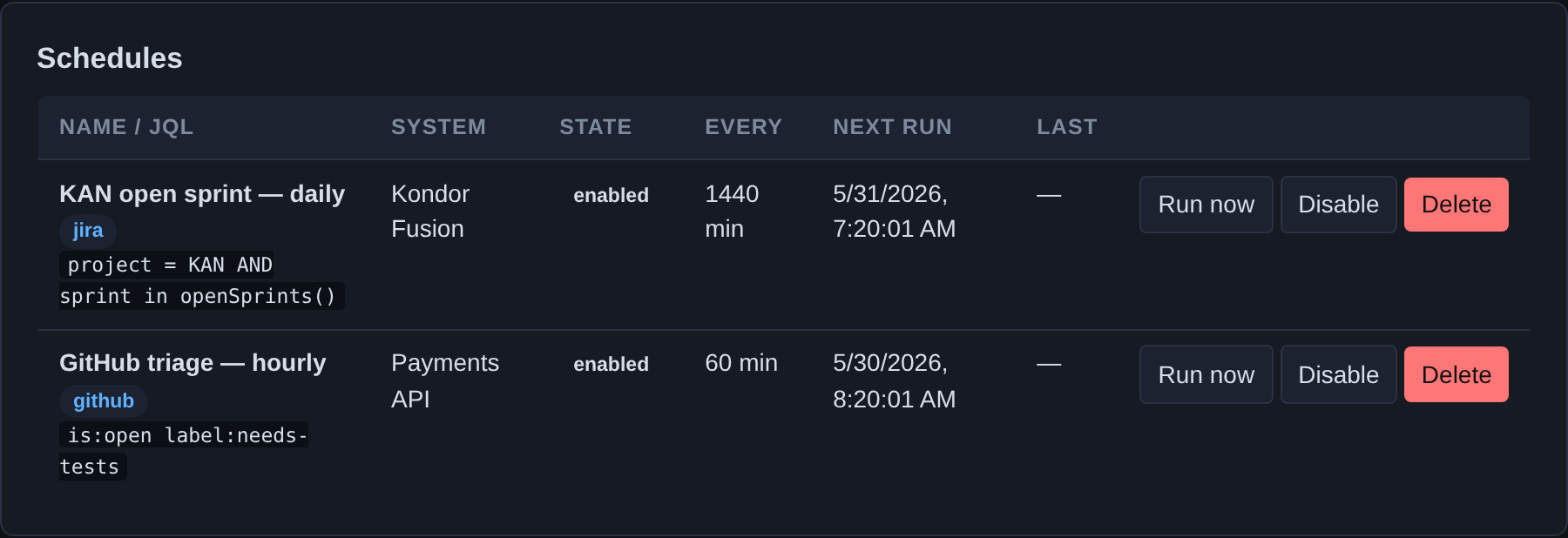
ScenarioForge schedules panel: recurring unattended generation runs across Jira and GitHub with run-now, enable/disable and next-run times.
Automation

Set it once. Scenarios show up on their own.

Pull a tracker query on a schedule, or let an inbound webhook fire the moment a ticket is created — ScenarioForge generates draft scenarios unattended, ready for review. Works across every connected tracker.

  • Recurring scheduled runs (per-tracker query + interval), with run-now and last-run status
  • Inbound webhook-driven generation on ticket create / transition
  • Hands-off, but never auto-publishes — drafts land for human approval first

Talk to us

[Core platform]

Ingest from Jira, AI scenario generation, the review console (edit / approve / regenerate), and push-back to Jira. Gherkin, CSV, Markdown, RTM & coverage outputs. 1 tenant, BYOK. Everything below builds on this.

Talk to us

[Tracker connectors]

Ingest & push beyond Jira: Linear, Azure DevOps, GitHub Issues, GitLab, JetBrains YouTrack. Comment + child-issue writers per tracker.

Talk to us

[Confluence publishing]

Publish per-bundle pages and the Requirement Traceability Matrix to your Confluence space, with idempotent updates. Reuses the Jira credential.

Talk to us

[Executable test cases]

Expand approved scenarios into step-level manual test cases, review them, export CSV/Excel, and publish to Jira / Xray sub-tasks.

Talk to us

[Automation]

Scheduled unattended runs (pull a query on an interval) and inbound webhook-driven generation — a new ticket triggers draft scenarios automatically. Works across every connected tracker.

Talk to us

[Multi-tenant & white-label]

Isolated tenants (users, settings, LLM keys, runs, audit logs), per-tenant branding, invite onboarding, and the white-label install script. The consultancy lever.

Talk to us

[Project Cockpit]

Tenant-configurable programme governance: Jira health dashboards, stage-gate tracking (G0–G6), RAID capture, SteerCo exports, and traceability views. Runs as its own self-hosted product alongside ScenarioForge Studio. See the full platform tour →

Talk to us

[Cockpit integration bridge]

Connect ScenarioForge to Project Cockpit: ingest programme tasks as run sources, pre-flight traceability gaps, and optional auto write-back. Included in the Combo bundle below.

Talk to us

[Combo] ScenarioForge + Project Cockpit

One integrated platform: AI test design (ScenarioForge) and programme governance (Project Cockpit), wired by the integration bridge. Self-hosted in your VPC — deployment and operator docs ship with your licence.

Talk to us
Annual, BYOK, self-host. Mix modules à la carte, take the Combo bundle, or choose a pre-bundled tier below. SSO/RBAC, audit-export, SAML, air-gap and SLA ride with the tiers — talk to us for a quote.
06 Bundles

Or take a bundle. No token margin, anywhere.

Five pre-built bundles for the common shapes — each rolls Core plus a set of modules into one annual, self-hosted licence. The difference is tenants, seats, trackers, and the depth of the support contract.

Solo
  • tenants 1
  • seats 5
  • trackers Jira only
  • support email · 5 business days
  • sso
BYOK · self-host
Team
  • tenants 1
  • seats 25
  • trackers 3 of 6
  • support email · 2 business days · SSO
  • sso OIDC
BYOK · self-host
Agency
  • tenants 30
  • seats unlimited
  • white-label full
  • support shared Slack · 4h response
  • sso SAML
BYOK · per-tenant keys
Enterprise
  • tenants unlimited
  • sla contract-defined
  • air-gap ✓ supported
  • adapters custom (tracker / writer)
  • support named TAM · NDA upfront
BYOK · air-gap-ready
07 For consultancies

One install. Many customers. Isolated everything.

The consultancy pattern: spin up Studio once, white-label it, hand one tenant to each client. Their users, their settings, their LLM keys, their runs, their audit logs — nothing leaks across the divider.

The dashboard reads branding.yaml per tenant: product name, header colour, logo, footer. ScenarioForge stays out of your customer's eye line.

Single Studio install · up to 10 tenants · illustrative mockup
scenarioforge.<your-domain> tenants: K / 10
<tenant-a> llm: <tenant-a's key> tracker: Jira · Xray seats: their own
<tenant-b> llm: <tenant-b's key> tracker: Linear seats: their own
<tenant-c> llm: <tenant-c's key> tracker: ADO seats: their own
<tenant-d> llm: <tenant-d's key> tracker: Jira · hierarchy seats: their own
<tenant-e> llm: <tenant-e's key> tracker: GitLab seats: their own
<tenant-f> llm: <tenant-f's key> tracker: GitHub seats: their own
audit logs — per-tenant, JSON-exportable
08 Vs. the field

The short version, on one row.

Full breakdown — including how we lose — available on request: scenarioforge@orbaos.com. Names redacted per their trademark policies.

ScenarioForge Tricentis Functionize Curiosity
Self-host ✓ / ✗
BYOK LLM partial
Multi-tracker (6+) partial partial
Multi-tenant

Feature comparison only. For a detailed breakdown against your shortlist, talk to us.

09 What a run looks like

Ingest, generate, review, push, publish — one structured log.

Every run emits structured JSON to stdout with an X-Request-ID threading through ingest, LLM, review, write, and publish steps. Sample line for a real-world 461-scenario run shown right.

10 FAQ

The questions that come up.

Eight of them. The first one is BYOK. Of course it is.

01What does BYOK actually mean here?
Your LLM credential is mounted into your ScenarioForge container as a secret. Prompts go from your container directly to the provider you chose (OpenAI, Azure, Bedrock, Anthropic, Gemini, vLLM). We never see, log, or proxy them. You pay your LLM provider directly; we don't sit in the token path and we don't take a margin.
02Can I run this air-gapped?
Yes, on the Enterprise tier. The licence is offline-verifiable (Ed25519). Pair with a self-hosted OpenAI-compatible LLM — vLLM, LM Studio, or a Bedrock VPC endpoint — and ScenarioForge runs with no outbound network access.
03How do I push to Jira?
Four writer modes, selectable per-run: comment on the source ticket, native Test (the built-in Jira test issue type), Xray, or Epic → Story → Sub-task hierarchy. The writer dropdown lives in the Push dialog on the run page; the mode is also configurable per-tenant.
04What if my customer uses Linear instead?
Linear, Azure DevOps, GitHub Issues, GitLab Issues, and YouTrack are all first-class. Same ingest → review → push flow; the writer modes shift to whatever maps in that tracker (Linear gets comment and sub-issue; ADO gets Test Case work item; etc).
05Does it support Confluence?
Yes. One-click publish: per-bundle pages plus a Requirement Traceability Matrix page. Re-publishing is idempotent — pages update in place, no duplicates. Notion and SharePoint aren't supported yet; on the roadmap, not on the v1 page.
06Multi-tenant — explain.
A single ScenarioForge install can host many tenants — one per end-client for consultancies, or one per business unit internally. Tenants have isolated users, settings, LLM keys, runs, and audit logs. Studio includes 10 tenants; Agency, 30; Enterprise, unlimited.
07What's NOT included today?
Test execution — ScenarioForge generates the scenarios and the code; you pair it with Cypress, Playwright, Tricentis Tosca, or Functionize to run them. No mobile app (the reviewer is laptop-first). Confluence is the only publish target today.
08SOC 2 / GDPR / data residency?
SOC 2 Type II audit is planned and underway. Until the report is final, what we can share today under NDA: an Ed25519-signed licence anyone can verify offline, a structured audit log of every action (per-tenant, JSON-exportable), an SBOM with a cosign signature on every image release, and a DPA template you can hand to your DPO. Because the deployment is yours, data residency is wherever your VPC lives — we don't host the workload, so the question of where customer data sits is answered by your own VPC.
09What does the 30-day trial actually unlock?
Everything. The trial licence we send you turns on every tracker (Jira, Linear, ADO, GitHub, GitLab, YouTrack), Confluence publishing, multi-tenant up to Enterprise limits, SSO, audit export, white-label — the lot. You burn runs against your own LLM key, so no token margin and no rate limit from us. After day 30 the install auto-downgrades to community mode (1 tenant, Jira-only, unlimited runs) — your data, tenants, and audit log all survive; you just lose the paid features until you upload a paid licence.
11 Get started

Self-hosted in your VPC. We handle the licence; you run the stack.

ScenarioForge deploys on your infrastructure with your LLM credential and your Jira (or other tracker) connection. Installation, Helm charts, and operator runbooks are provided with every licence — not on this public site.